Friday has arrived! It’s time for a recap of some of our favorite images shared to Flickr Social group in this week’s installment of Weekly Snapshot with Flickr Social. Join us over on Flickr Social and share your own photos for a chance to be featured.
It’s nearing the end of June and like many this time of year, we’ve got travel on our minds. Photographers may not always be able to travel lightly but if there is new scenery in the forecast, most likely they are bringing along some gear to capture the sites. This month while we think about where we might be headed to next, we took some time to talk with some of the pros who are out there documenting their adventures and sharing them on Flickr for us all to enjoy. Whether they’re taking a quick weekend getaway to a nearby city or venturing out an epic once in a lifetime trip, here are some tips from well traveled photographers to help you out on your own journeys.
Tony aka yeahbouyee on Flickr is a Washington DC-based photographer who enjoys a variety of photographic genres. His travel photos caught our eye and we wanted to chat with him about his travel photography and some of his best practices.
What’s the most important piece of gear you never travel without, and why?
I never travel without my iPhone – believe it or not, when I traveled to the Iberian peninsula two years ago, I hardly used my full frame camera. As cell phone cameras are on par with mirrorless and DSLR cameras (resolution-wise), I find myself taking photos with my iPhone 12 Pro Max – it’s easier to carry and I can get the same results as I can with my mirrorless. For more complicated shooting, I need my Sony a7RII and my 24-70mm and 70-200mm lenses. I still use my trusty Canon equipment too.
How do you research and prepare for photographing a new destination?
I use Flickr to do my initial research when scouting a new location to photograph. I find Flickr is an invaluable tool with its huge database of photos. I also use google earth and maps to virtually walk down streets and to scout terrain.
How do you balance showing the beauty of a place with its authentic reality?
I’ve learned that every place, whether it’s a bustling city center or a remote desert, has unique features and qualities about it that makes the location special. I aim to capture the unique characteristics about a place by showing its architecture, landscapes, or cultural activities.
Based in the Netherlands but often on the move, photographer Reinier Snijders documents his travels and the quickly changing scenery around him. His travel photography covers a wide range of locations and perspectives and we wanted to see what we could learn from his travels.
What’s been your most rewarding travel photography experience?
For me, it was my first ever photography road trip in the USA in September 2017. A friend and colleague who was also into photography and I decided to fly to Salt Lake City in Utah. From there, we hired a car and drove north to Jackson, Wyoming. I still remember the saloon where you could sit on a horse saddle at the bar. Another thing I remember about this town is a great art gallery where I saw one of the most impressive close-ups of a grizzly bear. From Jackson, we planned our photo spots in Grand Teton National Park. I think it’s one of the best places I’ve been to in the USA.
One morning, we went to String Lake to take a photo at sunrise and everything was perfect! There were clouds in the sky and no wind at all, and the lake was covered with some fog. There were just us and two other photographers there, capturing this beautiful scene. In the background, we could hear some moose making noise. I still get a big smile on my face when I think about that moment!
A couple of days later, my friend flew back to the Netherlands and I continued my trip south of Salt Lake City. Bryce Canyon, Horseshoe Bend, the Upper Antelope Canyon, Monument Valley, the Canyonlands and the Arches National Park were all on my itinerary. From that moment on, I fell in love with Utah! What an incredible state with landscapes that are a photographer’s dream! After taking in all these amazing sights, I went back to Salt Lake City and took a flight to New York City. I had a friend who was a photographer and lived in Manhattan, where I could stay for a few days. Having focused solely on landscapes, which I enjoy, it was time to awaken the urban photographer in me. I love New York: the skyline, the skyscrapers, and of course the streets, which offer so many photographic opportunities. It’s impossible to come home with boring photos of this city. From there, it was time to head home to the Netherlands. So yes, this was my first experience, and I think it was my most rewarding one.
What’s a location that completely changed your perspective as a photographer?
That’s a difficult question. Perhaps it’s not just one location, but rather similar situations in different places. When I’m in the US, for example, I wake up early because of the time difference. At 3 or 4 am, I go out onto the streets to take photographs of the city at night. It doesn’t matter where I am, Chicago, New York, Toronto, San Francisco or Vancouver, for example, but walking down the streets in the middle of the night is what I like to do. It’s much easier to capture atmosphere and mood in your shots in the dark, and there are far fewer people, which makes it easier to get shots without people. However, the people who are on the streets at that time of day are another matter. There are early workers, such as people who keep the city clean; party people on their way home; and people who are struggling with their lives, such as the homeless, drug addicts and the mentally disturbed. I see them in every major city around the world, but especially in the US and Canada. It’s sad to witness the reality of today’s world, but from a photographer’s perspective, it adds an extra dimension to my work. However, it also raises a question that keeps popping into my mind: ‘Do I want to take photos of other people’s misery?’ Or do you want to show viewers the dark side of their city? I still don’t have an answer to this question.
How do you handle challenging lighting conditions when you can’t return to a location?
Just make the best of it! If you’re talking about the weather, there’s nothing you can do about it. As I always say, ‘Sometimes you win, sometimes you lose’ and ‘You can’t have it all’. When it comes to post-processing, there’s a lot you can do to spice things up. Changing from colour to black and white helps too. I always use only the available light, and with a good camera, mine is the Sony A7r5, it makes things easier if you’re struggling with the light. The dynamic range of this camera is amazing! Sometimes I use bracketing when the lighting conditions are difficult, especially for indoor architectural shots. When shooting on the streets at night, I simply increase my ISO and use my Sony Zeiss 55 1.8mm lens. With this combination, I can handle the most challenging light conditions.
How has your editing style evolved to complement your travel work?
I spend a lot of time on post-processing. I see it as an important part of photography. In my view, 50% of the work is done on location, capturing the perfect moment, while the other 50% is done at home, where I have a large screen, a Wacom tablet, some background music and a cup of coffee. My editing techniques have evolved since I started photography. It’s an ongoing journey, and improvements in software make my life easier and improve my editing. A few years ago, I realized that although my photos were good in terms of composition, if I wanted to improve, I also had to invest time in processing. My girlfriend gave me a year’s membership of Kelby One for my birthday, which was one of the best presents I received that year. I learnt a lot about processing techniques and lots of other useful stuff there. To speed up my editing, I created some Lightroom presets that I mostly use on my laptop when traveling.
Don’t miss our Travel themed Explore Takeover!
We want your summer travel plans to continue so we’re dedicating our June Explore Takeover all to travel photography. The Flickr community has been showing up to Flickr Social with some gorgeous shots and you’ll get to see our manually curated collection featuring some of those, this Thursday, June 26th! Stay tuned to the Explore page and make sure to check it out on Thursday for more adventures in travel photography.
Not a Flickr member yet? Sign up today to join our community of photographers and find your inspiration.
Last week, Lunar New Year rolled around, and with it, so much breathtaking art here on our dashboards. Happy Year of the Snake to you all. May this one bring some good things your way, and may this little collection of Lunar New Year sneks be one of those things.
Poker-themed roguelike deck-building game Balatro is experiencing a resurgence thanks to Markiplier and has taken Tumblr by storm with its nostalgic Windows 98 vibes and tricksy jokers. Of course, the fanart is incredible. Please enjoy these offerings from your #Artists on Tumblr. (And, please, do proceed with caution if jesters aren’t quite your thing.)
Creating an open source software is an ongoing and exciting process. Recently, Oak open-source library delivered a new release: Oak0.2, which summarizes a year of collaboration. Oak0.2 makes significant improvements in throughput, memory utilization, and user interface.
OakMap is a highly scalable Key-Value Map that keeps all keys and values off-heap. The Oak project is designed for Big Data real-time analytics. Moving data off-heap, enables working with huge memory sizes (above 100GB) while JVM is struggling to manage such heap sizes. OakMap implements the industry-standard Java8 ConcurrentNavigableMap API and more. It provides strong (atomic) semantics for read, write, and read-modify-write, as well as (non-atomic) range query (scan) operations, both forward and backward. OakMap is optimized for big keys and values, in particular, for incremental maintenance of objects (update in-place). It is faster and scales better with additional CPU cores than the popular Java’s ConcurrentNavigableMap implementation ConcurrentSkipListMap.
Oak data is written to the off-heap buffers, thus needs to be serialized (converting an object in memory into a stream of bytes). For retrieval, data might be deserialized (object created from the stream of bytes). In addition, to save the cycles spent on deserialization, we allow reading/updating the data directly via OakBuffers. Oak provides this functionality under the ZeroCopy API.
If you aren’t already familiar with Oak, this is an excellent starting point to use it! Check it out and let us know if you have any questions.
Oak keeps getting better: Introducing Oak0.2
We have made a ton of great improvements to Oak0.2, adding a new stream scanning for improved performance, releasing a ground-up rewrite of our Zero Copy API’s buffers to increase safety and performance, and decreasing the on-heap memory requirement to be less than 3% of the raw data! As an exciting bonus, this release also includes a new version of our off-heap memory management, eliminating memory fragmentation.
Below we dive deeper into sub-projects being part of the release.
Stream Data Faster
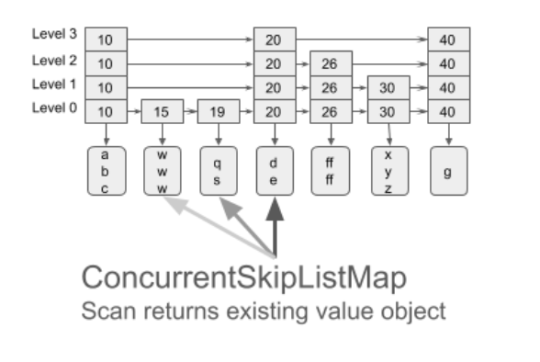
When scanned data is held by any on-heap data structures, each next-step is very easy: get to the next object and return it. To retrieve the data held off-heap, even when using Zero-Copy API, it is required to create a new OakBuffer object to be returned upon each next step. Scanning Big Data that way will create millions of ephemeral objects, possibly unnecessarily, since the application only accesses this object in a short and scoped time in the execution.
To avoid this issue, the user can use our new Stream Scan API, where the same OakBuffer object is reused to be redirected to different keys or values. This way only one element can be observed at a time. Stream view of the data is frequently used for flushing in-memory data to disk, copying, analytics search, etc.
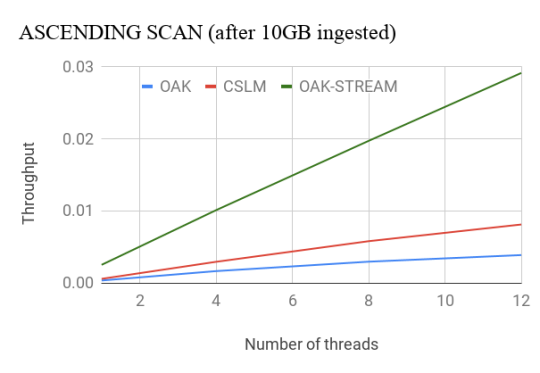
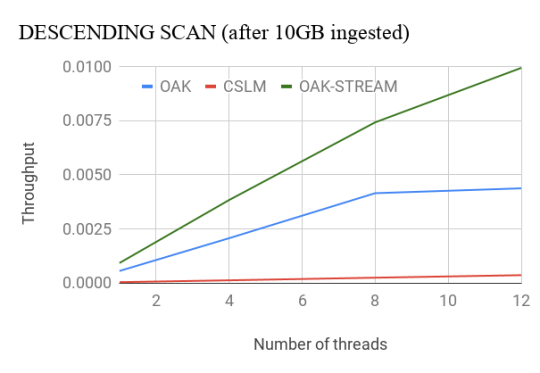
Oak’s Stream Scan API outperforms CSLM by nearly 4x for the ascending case. For the descending case, Oak outperforms CSLM by more than 8x even with less optimized non-stream API. With the Stream API, Oak’s throughput doubles. More details about the performance evaluation can be found here.
Safety or Performance? Both!
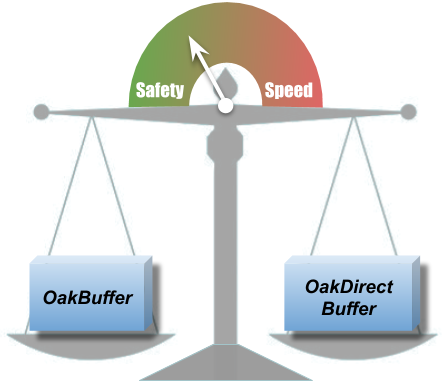
OakBuffers are core ZeroCopy API primitives. Previously, alongside with OakBuffers, OakMap exposed the underlying ByteBuffers directly to the user, for the performance. This could cause some data safety issues such as an erroneous reading of the wrong data, unintentional corrupting of the data, etc. We couldn’t choose between safety and performance, so strived to have both!
With Oak0.2, ByteBuffer is never exposed to the user. Users can choose to work either with OakBuffer which is safe or with OakUnsafeDirectBuffer which gives you faster access, but use it carefully. With OakUnsafeDirectBuffer, it is the user’s responsibility to synchronize and not to access deleted data, if the user is aware of those issues, OakUnsafeDirectBuffer is safe as well.
Our safe OakBuffer works with the same, great and known, OakMap performance, which wasn’t easy to achieve. However, if the user is interested in even superior speed of operations, any OakBuffer can be cast to OakUnsafeDirectBuffer.
Less (metadata) is more (data)
In the initial version of OakMap we had an object named handler that was a gateway to access any value. Handler was used for synchronization and memory management. Handler took about 256 bytes per each value and imposed dereferencing on each value access.
Handler is now replaced with an 8-bytes header located in the off-heap, next to the value. No dereferencing is needed. All information needed for synchronization and memory manager is kept there. In addition, to keep metadata even smaller, we eliminated the majority of the ephemeral object allocations that were used for internal calculations.
This means less memory is used for metadata and what was saved goes directly to keep more user data in the same memory budget. More than that, JVM GC has much less reasons to steal memory and CPU cycles, even when working with hundreds of GBs.
Fully Reusable Memory for Values
As explained above, 8-byte off-heap headers were introduced ahead of each value. The headers are used for memory reclamation and synchronization, and to hold lock data. As thread may hold the lock after a value is deleted, the header’s memory couldn’t be reused. Initially the header’s memory was abandoned, causing a memory leak.
The space allocated for value is exactly the value size, plus header size. Leaving the header not reclaimed, creates a memory “hole” where a new value of the same size can not fit in. As the values are usually of the same size, this was causing fragmentation. More memory was consumed leaving unused spaces behind.
We added a possibility to reuse the deleted headers for new values, by introducing a sophisticated memory management and locking mechanism. Therefore the new values can use the place of the old deleted value. With Oak0.2, the scenario of 50% puts and 50% deletes is running with a stable amount of memory and performs twice better than CSLM.
We look forward to growing the Oak community! We invite you to explore the project, use OakMap in your applications, raise issues, suggest improvements, and contribute code. If you have any questions, please feel free to send us a note. It would be great to hear from you!
Kishor Patil, PMC Chair Apache Storm & Sr. Principal Software Systems Engineer, Verizon Media
Last year, we shared with you many of the Apache Storm 2.0 improvements contributed by Verizon Media. At Yahoo/Verizon Media, we’ve been committing to Storm for many years. Today, we’re excited to explore a few of the new features, improvements, and bug fixes we’ve contributed to Storm 2.2.0.
NUMA Support
The server hardware is getting beefier and requires worker JVMs to be NUMA (Non-uniform memory access) aware. Without constraining JVMs to NUMA zones, we noticed dramatic degradation in the JVM performance; specifically for Storm where most of the JVM objects are short-lived and continuous GC cycles perform complete heap scan. This feature enables maximizing hardware utilization and consistent performance on asymmetric clusters. For more information please refer to [STORM-3259].
Auto Refreshing SSL Certificates for All Daemons
At Verizon Media, as part of maintaining thousands of Storm nodes, refreshing SSL/TLS certificates without any downtime is a priority. So we implemented auto refreshing SSL certificates for all daemons without outages. This becomes a very useful feature for operation teams to monitor and update certificates as part of hassle free continuous monitoring and maintenance. Included in the security related critical bug fixes the Verizon Media team noticed and fixed are:
Kerberos connectivity from worker to Nimbus/Supervisor for RPC heartbeats [STORM-3579]
This allows for deprecated metrics at worker level to utilize messaging and capture V1 metrics. This is a stop-gap giving topology developers sufficient time to switch from V1 metrics to V2 metrics API. The Verizon Media Storm team also provided shortening metrics names to allow for metrics names that conform to more aggregation strategies by dimension [STORM-3627]. We’ve also started removing deprecated metrics API usage within storm-core and storm-client modules and adding new metrics at nimbus/supervisor daemon level to monitor activity.
Scheduler Improvements
ConstraintSolverStrategy allows for max co-location count at the Component Level. This allows for better spread - [STORM-3585]. Both ResourceAwareScheduler and ConstraintSolverStrategy are refactored for faster performance. Now a large topology of 2500 component topology requesting complex constraints or resources can be scheduled in less than 30 seconds. This improvement helps lower downtime during topology relaunch - [STORM-3600]. Also, the blacklisting feature to detect supervisor daemon unavailability by nimbus is useful for failure detection in this release [STORM-3596].
OutputCollector Thread Safety
For messaging infrastructure, data corruption can happen when components are multi-threaded because of non thread-safe serializers. The patch [STORM-3620] allows for Bolt implementations that use OutputCollector in other threads than executor to emit tuples. The limitation is batch size 1. This important implementation change allows for avoiding data corruption without any performance overhead.
Noteworthy Bug Fixes
For LoadAwareShuffle Grouping, we were seeing a worker overloaded and tuples timing out with load aware shuffle enabled. The patch checks for low watermark limits before switching from Host local to Worker local - [STORM-3602].
For Storm UI, the topology visualization related bugs are fixed so topology DAG can be viewed more easily.
The bug fix to allow the administrator access to topology logs from UI and logviewer.
storm cli bug fixes to accurately process command line options.
What’s Next
In the next release, Verizon Media plans to contribute container support with Docker and RunC container managers. This should be a major boost with three important benefits - customization of system level dependencies for each topology with container images, better isolation of resources from other processes running on the bare metal, and allowing each topology to choose their worker OS and java version across the cluster.
Yahoo Research is excited to announce the 2019 Faculty and Research Engagement Program (FREP) recipients. This year, we received 100+ proposals from a variety of prestigious institutions around the world. The competition was intense, the review process was difficult, and making the final decisions wasn’t easy. The grants will support professors and students who explore a diverse set of fields, including machine learning, distributed systems, online security, content understanding and recommendation, and images and video understanding.
FREP awards grants to faculty members in support of research to enhance people’s lives by improving the internet. FREP was founded in 2012 to foster cutting-edge collaborations between scientists in academic settings and those at Yahoo Research. We look forward to the insights, scientific advances, and relationships that will grow from FREP over the coming year and for many years to come!
Congratulations to these very impressive researchers:
Acceleration for Data Science and Machine Learning
The Spin Dana White calls out Cris ‘Cyborg’ Justino, tells her to ‘have a nice life’
Cris “Cyborg” Justino’s apology to Dana White didn’t mend the fences between the two. In fact, it seemed to be the last straw for White, who told reporters Tuesday that Justino was a “nightmare. White also expressed no regret at Justino leaving UFC, telling Justino, “See ya later.
The Spin Katelyn Ohashi’s life changed after her perfect 10 went viral
Former UCLA gymnast and six time All-American Katelyn Ohashi went viral in January of 2019 when she scored a ten on her floor routine. But the perfect score was just the beginning of a whirlwind year for the standout collegiate athlete.
KDD 2019 in Anchorage, Alaska, has been fantastic so far and yesterday was especially exciting as we won AdKDD’s Runner-Up Best Paper Award for “Time-Aware Prospective Modeling of Users for Online Display Advertising”.
Join us for a Q&A about She-Ra and the Princesses of Power season two with showrunner Noelle Stevenson and the cast, moderated by Yahoo! Entertainment’s Angela Kim!
By Akshay Sarma, Principal Engineer, Verizon Media & Brian Xiao, Software Engineer, Verizon Media
This is the first of an ongoing series of blog posts sharing releases and announcements for Bullet, an open-sourced lightweight, scalable, pluggable, multi-tenant query system.
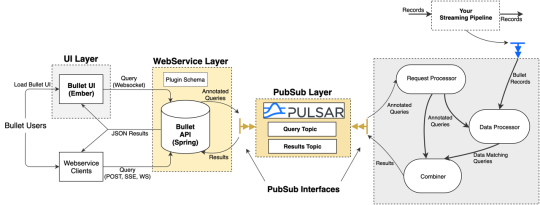
Bullet allows you to query any data flowing through a streaming system without having to store it first through its UI or API. The queries are injected into the running system and have minimal overhead. Running hundreds of queries generally fit into the overhead of just reading the streaming data. Bullet requires running an instance of its backend on your data. This backend runs on common stream processing frameworks (Storm and Spark Streaming currently supported).
The data on which Bullet sits determines what it is used for. For example, our team runs an instance of Bullet on user engagement data (~1M events/sec) to let developers find their own events to validate their code that produces this data. We also use this instance to interactively explore data, throw up quick dashboards to monitor live releases, count unique users, debug issues, and more.
Since open sourcing Bullet in 2017, we’ve been hard at work adding many new features! We’ll highlight some of these here and continue sharing update posts for future releases.
Windowing
Bullet used to operate in a request-response fashion - you would submit a query and wait for the query to meet its termination conditions (usually duration) before receiving results. For short-lived queries, say, a few seconds, this was fine. But as we started fielding more interactive and iterative queries, waiting even a minute for results became too cumbersome.
Enter windowing! Bullet now supports time and record-based windowing. With time windowing, you can break up your query into chunks of time over its duration and retrieve results for each chunk. For example, you can calculate the average of a field, and stream back results every second:
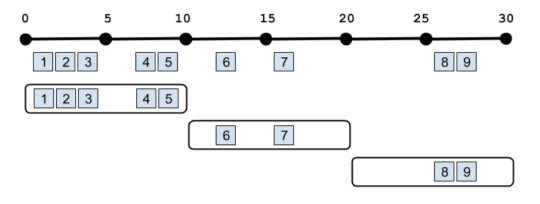
In the above example, the aggregation is operating on all the data since the beginning of the query, but you can also do aggregations on just the windows themselves. This is often called a Tumbling window:
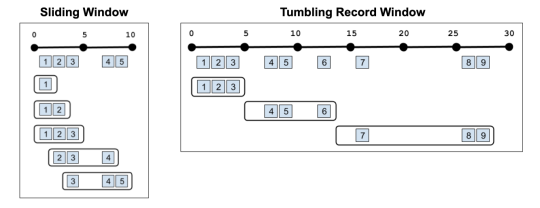
With record windowing, you can get the intermediate aggregation for each record that matches your query (a Sliding window). Or you can do a Tumbling window on records rather than time. For example, you could get results back every three records:
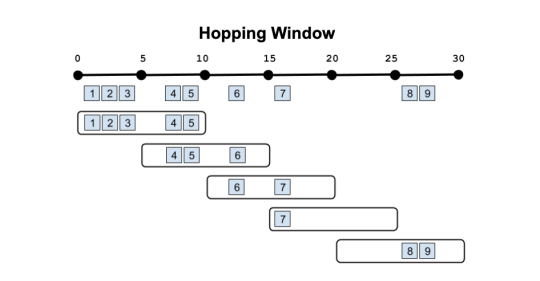
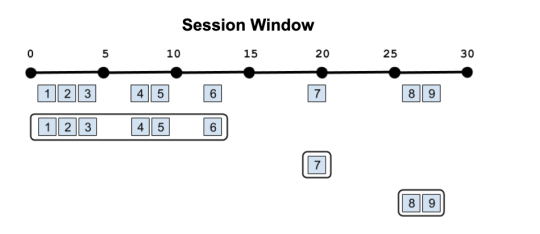
Overlapping windows in other ways (Hopping windows) or windows that reset based on different criteria (Session windows, Cascading windows) are currently being worked on. Stay tuned!
Apache Pulsar support as a native PubSub
Bullet uses a PubSub (publish-subscribe) message queue to send queries and results between the Web Service and Backend. As with everything else in Bullet, the PubSub is pluggable. You can use your favorite pubsub by implementing a few interfaces if you don’t want to use the ones we provide. Until now, we’ve maintained and supported a REST-based PubSub and an Apache Kafka PubSub. Now we are excited to announce supporting Apache Pulsar as well! Bullet Pulsar will be useful to those users who want to use Pulsar as their underlying messaging service.
If you aren’t familiar with Pulsar, setting up a local standalone is very simple, and by default, any Pulsar topics written to will automatically be created. Setting up an instance of Bullet with Pulsar instead of REST or Kafka is just as easy. You can refer to our documentation for more details.
Plug your data into Bullet without code
While Bullet worked on any data source located in any persistence layer, you still had to implement an interface to connect your data source to the Backend and convert it into a record container format that Bullet understands. For instance, your data might be located in Kafka and be in the Avro format. If you were using Bullet on Storm, you would perhaps write a Storm Spout to read from Kafka, deserialize, and convert the Avro data into the Bullet record format. This was the only interface in Bullet that required our customers to write their own code. Not anymore! Bullet DSL is a text/configuration-based format for users to plug in their data to the Bullet Backend without having to write a single line of code.
Bullet DSL abstracts away the two major components for plugging data into the Bullet Backend. A Connector piece to read from arbitrary data-sources and a Converter piece to convert that read data into the Bullet record container. We currently support and maintain a few of these - Kafka and Pulsar for Connectors and Avro, Maps and arbitrary Java POJOs for Converters. The Converters understand typed data and can even do a bit of minor ETL (Extract, Transform and Load) if you need to change your data around before feeding it into Bullet. As always, the DSL components are pluggable and you can write your own (and contribute it back!) if you need one that we don’t support.
We appreciate your feedback and contributions! Explore Bullet on GitHub, use and help contribute to the project, and chat with us on Google Groups. To get started, try our Quickstarts on Spark or Storm to set up an instance of Bullet on some fake data and play around with it.
Akiko Fujita joins the team today as an on-air anchor/reporter, coming from CNBC International where she was previously the Hong Kong-based co-host of Squawk Box Asia. Akiko will work across the daily live shows, covering markets and other stories of the day.
In addition to co-anchoring Squawk Box Asia out of Hong Kong, Akiko also reported across the region, with a heavy focus on the tech sector, and covered some of the biggest political stories in the region, including the Trump-Kim Summit. Prior to CNBC, Akiko was a Tokyo-based correspondent for ABC News, where she led network coverage of the 2011 tsunami and nuclear disaster in Japan.
A Los Angeles native, Akiko is a graduate of the University of Southern California, where she majored in Broadcast Journalism and International Relations.
Akiko Fujita pictured above
McKenzie Stratigopoulos joined Yahoo Finance as the producer of, “The Ticker.” For the past two years, McKenzie was a producer at the Fox Business Network, most recently working as the line producer of “Mornings with Maria.”
Meghan Fitzgerald joined Yahoo Finance as an associate producer. Previously, Meghan worked as a booker/producer for Fox News Channel.
Bridgette Webb started recently as an associate producer, having spent the past year and a half at Cheddar. Previously, Bridgette was a segment producer for Bloomberg Television.
Alexandra Canal joins Yahoo Finance as an associate producer. She joins the team from “PEOPLE Now,” PEOPLE.com’s daily digital live show.
Grete Suarez joins Yahoo Finance as an associate producer. Grete was previously a segment producer at Fox Business’ “Cavuto: Coast to Coast.”
Devin Southard comes from Envision Networks where she was the senior booker and producer for morning drive radio shows across the country. At Yahoo Finance, Devin is a segment producer focusing on guest booking across multiple programs.
Sarah Smith joins the team as a segment producer. For the past two years, Sarah was a production assistant at The Today Show.
Marabia Smith is now a segment producer for “On the Move.” Marabia was previously a broadcast associate for CBS This Morning.
Last month Yahoo Finance extended its daily live programming to eight hours which includes six daily shows and an additional special weekly program hosted by Yahoo Finance’s editor in chief, “Influencers with Andy Serwer,” on Thursdays at 5pm ET. Throughout the day, anchors and analysts provide expert commentary on breaking news, political stories, pop culture moments and the day’s stock market activity.
OpenTSDB is one of the first dedicated open source time series databases built on top of Apache HBase and the Hadoop Distributed File System. Today, we are proud to share that version 2.4.0 is now available and has many new features developed in-house and with contributions from the open source community. This release would not have been possible without support from our monitoring team, the Hadoop and HBase developers, as well as contributors from other companies like Salesforce, Alibaba, JD.com, Arista and more. Thank you to everyone who contributed to this release!
A few of the exciting new features include:
Rollup and Pre-Aggregation Storage
As time series data grows, storing the original measurements becomes expensive. Particularly in the case of monitoring workflows, users rarely care about last years’ high fidelity data. It’s more efficient to store lower resolution “rollups” for longer periods, discarding the original high-resolution data. OpenTSDB now supports storing and querying such data so that the raw data can expire from HBase or Bigtable, and the rollups can stick around longer. Querying for long time ranges will read from the lower resolution data, fetching fewer data points and speeding up queries.
Likewise, when a user wants to query tens of thousands of time series grouped by, for example, data centers, the TSD will have to fetch and process a significant amount of data, making queries painfully slow. To improve query speed, pre-aggregated data can be stored and queried to fetch much less data at query time, while still retaining the raw data. We have an Apache Storm pipeline that computes these rollups and pre-aggregates, and we intend to open source that code in 2019. For more details, please visit http://opentsdb.net/docs/build/html/user_guide/rollups.html.
Histograms and Sketches
When monitoring or performing data analysis, users often like to explore percentiles of their measurements, such as the 99.9th percentile of website request latency to detect issues and determine what consumers are experiencing. Popular metrics collection libraries will happily report percentiles for the data they collect. Yet while querying for the original percentile data for a single time series is useful, trying to query and combine the data from multiple series is mathematically incorrect, leading to errant observations and problems. For example, if you want the 99.9th percentile of latency in a particular region, you can’t just sum or recompute the 99.9th of the 99.9th percentile.
To solve this issue, we needed a complex data structure that can be combined to calculate an accurate percentile. One such structure that has existed for a long time is the bucketed histogram, where measurements are sliced into value ranges and each range maintains a count of measurements that fall into that bucket. These buckets can be sized based on the required accuracy and the counts from multiple sources (sharing the same bucket ranges) combined to compute an accurate percentile.
Bucketed histograms can be expensive to store for highly accurate data, as many buckets and counts are required. Additionally, many measurements don’t have to be perfectly accurate but they should be precise. Thus another class of algorithms could be used to approximate the data via sampling and provide highly precise data with a fixed interval. Data scientists at Yahoo (now part of Oath) implemented a great Java library called Data Sketches that implements the Stochastic Streaming Algorithms to reduce the amount of data stored for high-throughput services. Sketches have been a huge help for the OLAP storage system Druid (also sponsored by Oath) and Bullet, Oath’s open source real-time data query engine.
The latest TSDB version supports bucketed histograms, Data Sketches, and T-Digests.
Some additional features include:
HBase Date Tiered Compaction support to improve storage efficiency.
A new authentication plugin interface to support enterprise use cases.
An interface to support fetching data directly from Bigtable or HBase rows using a search index such as ElasticSearch. This improves queries for small subsets of high cardinality data and we’re working on open sourcing our code for the ES schema.
Greater UID cache controls and an optional LRU implementation to reduce the amount of JVM heap allocated to UID to string mappings.
Configurable query size and time limits to avoid OOMing a JVM with large queries.
Try the releases on GitHub and let us know of any issues you run into by posting on GitHub issues or the OpenTSDB Forum. Your feedback is appreciated!
OpenTSDB 3.0
Additionally, we’ve started on 3.0, which is a rewrite that will support a slew of new features including:
Querying and analyzing data from the plethora of new time series stores.
A fully configurable query graph that allows for complex queries OpenTSDB 1x and 2x couldn’t support.
Streaming results to improve the user experience and avoid overwhelming a single query node.
Advanced analytics including support for time series forecasting with Yahoo’s EGADs library.
Please join us in testing out the current 3.0 code, reporting bugs, and adding features.
By Aditya Bandi and Shiv Shankar, Yahoo Mail Product Team
At Yahoo Mail, we’re always striving to provide more tools that help users manage their email inboxes as efficiently as possible. We’re now introducing two new features that will bring more organization and less clutter: our Reminders and Unsubscribe features.
Reminders
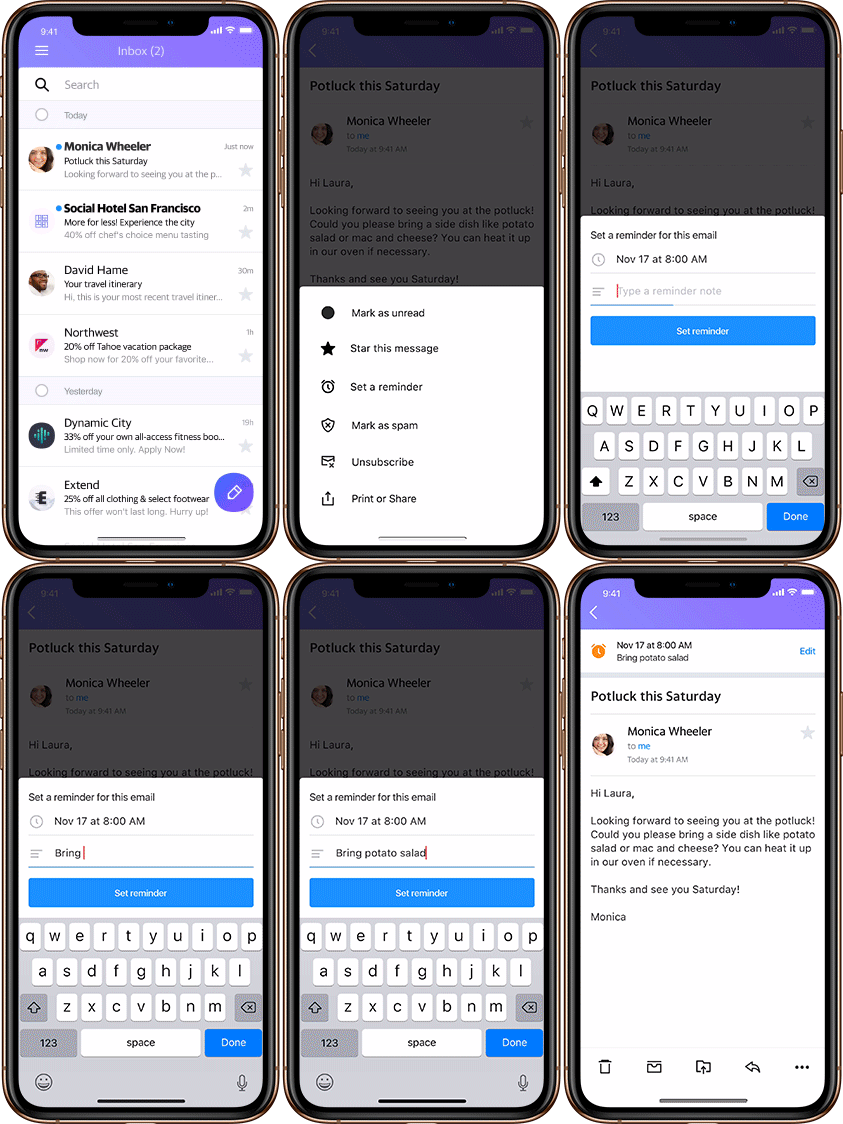
Users can now set reminders within emails to prioritize what matters the most to them. Real life example: just opened an email about the utility bill that’s due soon? Set a reminder to pay it in five days, and a notification will pop up then.
This feature has a notes section to add text, and can be set for a specific date and time in the future. To enable a quick set up, Reminders suggests which emails should have reminders and recommends timing, all based on email content. Reminders can always be edited, updated and deleted at any time through a “Manage Reminder” option. Plus, users can view inactive ones whenever they want.
Unsubscribe
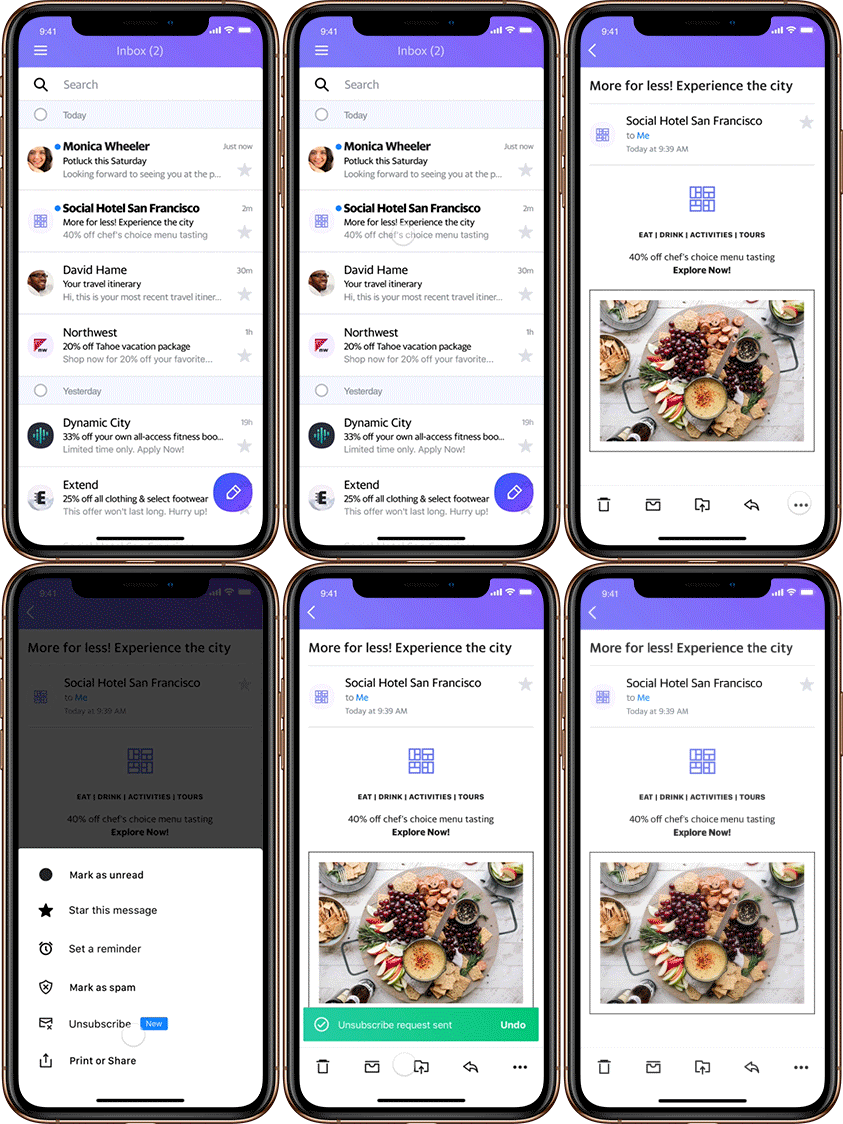
Implemented as an easy-to-find button when opening a message, the Unsubscribe feature lets users easily stop receiving emails without ever having to leave their Yahoo Mail inboxes. An option to unsubscribe from an email sender appears in each email. And in case users erroneously clicked the Unsubscribe button, they can reverse the unsubscribe action, up to three seconds after the initial click.
Our Unsubscribe feature helps keep inboxes clean and filled only with relevant content, making the entire unsubscribe process quick, efficient and stress-free. E-newsletter senders and email marketers should also find a benefit, as they’ll see a reduction in spam votes and be incentivized to deliver engaging high-quality content, since readers who are no longer interested will quickly be able to unsubscribe.
Start Using These Features
Both of these new features are available immediately across iOS and Android, so start using them and let us know what you think. Also, be on the lookout for additional feature updates in the very near future. In fact, we’re already working on an unsubscribe recommendation option, where users can opt to receive automatic recommendations around which emails to unsubscribe from.
Have any suggestions for future Yahoo Mail updates? We’d love to hear them! If you’re using the mobile browser, go to the side panel and tap on “Send feedback.” If you’re using the Yahoo Mail app, go to Settings and tap on “Send feedback.”
Yahoo News has live comprehensive original reporting and analysis on midterm election night, Nov. 6. Coverage will be led by Yahoo News’ Stephanie Sy and Matt Bai. They will be joined throughout the night by a dynamic team of Yahoo News and HuffPost journalists, including Yahoo News Editor in Chief Daniel Klaidman and HuffPost Editor in Chief Lydia Polgreen.
Coverage will be live-streamed from Oath Studios in New York and will run from 8:00 p.m. to 11:30 p.m. ET. Oath, a subsidiary of Verizon Communications, will promote the live news event across its powerful global distribution platform, which reaches more than 1 billion active users monthly — this includes Yahoo.com, AOL.com, Yahoo News, HuffPost, Tumblr and more.
The long awaited “Somebody commented on your answer” notification is here! No longer will you need to keep dozens of tabs open to check for replies on your answers. Instead, you will be notified when someone comments on an answer you have written.
Notification Controls
If the notifications get overwhelming you can always switch them off by clicking the gear icon in the upper right corner of the feed.
This post kicks off the redesign the Yahoo Answers Tumblr. We wanted a design that would accommodate long form posts to reflect the shift in content. This blog will no longer be posting interesting questions asked on Yahoo Answers. Instead, it will be used to chronicle and clarify the changes to the website.
Since this is the “first” blog post, I’ll recap some of the things that the team has been working on the last two months.
Notifications
The notifications page has been fixed! For many users, us included, the notifications page was empty. In addition, new notification types are on their way, so you’ll be able to keep track of the conversations you’re having in the comments section.
Unfortunately, email notifications are still out of action, but we’re working on their replacement!
Spam
You probably remember the overwhelming amount of spam present on the site a couple of months ago, with spam written in Mandarin being the most prevalent. We added several new spam filters and updated some old ones; this resulted in spam decreasing by ~95% across the site. We’re still making adjustments to continually lower spam and our false positive rate.
Left Rail
We added the categories back to the left rail of the website, making it much easier to get where you’re needed most!
Ads
We removed almost all the ads from all pages. All that remains is a single ad in the right rail.
Removed Video Uploading
We removed the rarely used option to upload videos to questions asked on Yahoo Answers.
By Michael Albers, VP of Communication Products at Oath
A while back we announced that we had completely modernized the technology that powered Yahoo Messenger. We made significant upgrades to key areas like photo sharing, made the service faster and more secure.
With the new platform, we were also able to build new types of messaging products and integrations. For example, our recently announced group messaging product, Yahoo Squirrel, aimed at improving the productivity of messaging, is based on this platform. Note: Yahoo Squirrel is invite-only still, but we will be opening it up to everyone shortly.
While there are many big messaging services today, just as in many things, the next phase of disruption in messaging is right around the corner. That is where we as engineers, product managers and designers have shifted our focus.
So as we continue to build and innovate products on our new messaging platform, we are announcing today that we will retire Yahoo Messenger, effective July 17, 2018.
Yahoo Messenger has had an amazing run. Over its twenty years, Yahoo Messenger introduced hundreds of millions of people to the joys of just the right emoticon for the moment (aka emojis). Yahoo Messenger changed the lives of millions, and thousands of people have sent us letters and photos over the years to share their stories of meeting a spouse over the service, keeping in touch with kids while serving overseas in the military, or introducing grandparents to new members of the family from across the globe.
We are thankful to the hundreds of millions who have used Messenger over the years as well as the thousands who have worked on it inside Yahoo for more than two decades.
Yahoo Aviate Launcher will no longer be supported after Thursday, March 8, 2018. You will no longer see new content in the stream, and Aviate will not be supported or updated.
Thank you for being a loyal Aviate user. We learned a lot working on Aviate for you, and hope you enjoyed the experience. Our team is engaged on new and exciting projects, leveraging our learnings and technology from Aviate.
WHAT: Vespa meetup with various presentations from the Vespa team.
Several Vespa developers from Norway are in Sunnyvale, use this opportunity to learn more about the open big data serving engine Vespa and meet the team behind it.
WHEN: Monday, December 4th, 6:00pm - 8:00pm PDT
WHERE: Oath/Yahoo Sunnyvale Campus Building E, Classroom 9 & 10 700 First Avenue, Sunnyvale, CA 94089
This meetup is a good arena for sharing experience, get good tips, get inside details in Vespa, discuss and impact the roadmap, and it is a great opportunity for the Vespa team to meet our users. Hope to see many of you!
By Mike Shebanek, Yahoo Senior Director of Accessibility
You may have heard that we just launched our new Yahoo Mail desktop experience that makes it even easier to access and organize all of the important information in your Inbox. The new version of desktop Mail has been completely redesigned from the ground up, sits on our latest tech stack, and is fast, reliable, and intuitive to use. It however also takes a huge leap forward for accessibility, with many user interface and assistive technology compatibility improvements.
Yahoo’s Accessibility team and the Yahoo Mail team have been closely working together from the beginning of this project to identify and address previous barriers to accessibility and efficiency, and the teams have poured themselves into this new release.
With the new Yahoo Mail experience, NVDA and VoiceOver screen reader users have access to the full desktop Yahoo Mail experience including threaded message viewing, stationery, animated gifs, emoji, and more. The Inbox is also now presented as a table which makes it faster and easier to use and allows you to control what information you hear about each message. For example, screen reader users can find or mark messages as read or unread, delete or star them, and know how many messages are in a thread all from the Inbox without first having to open the message.
In addition to a new beautiful design that reduces visual clutter and improves responsiveness, we’ve also updated the set of visual themes including a new “dark” theme that provides high contrast using a dark background with bright text. This is helpful for light-sensitive and low-vision users. There’s also a new Inbox spacing option that reduces the need to pan around the screen when using high magnification. Of course, Yahoo Mail is also fully navigable using a keyboard alone (i.e. “tab key navigation”).
The images below show the default (black on white) Yahoo Mail theme and the new dark high-contrast theme.
By Austin Shoemaker, Senior Director, Product Management
Today we’re announcing three new features designed to give you an even better Yahoo Messenger experience. This comes on the heels of our new read receipt and typing indicator features, which make it easy to see who’s caught up on the conversation.
Touch ID
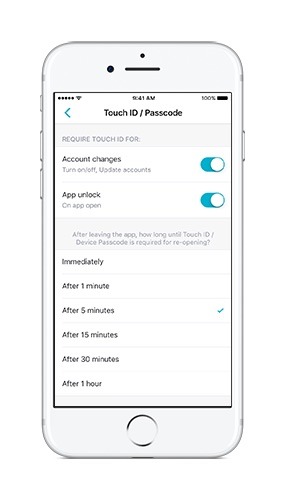
Want to keep your Yahoo Messenger conversations a bit more secure? We’ve added the ability in your app settings to set up Touch ID in your mobile app so you’re the only one who will be able to access the app. Any time you want to open Yahoo Messenger, just unlock with your fingerprint and chat away.
@Mentions
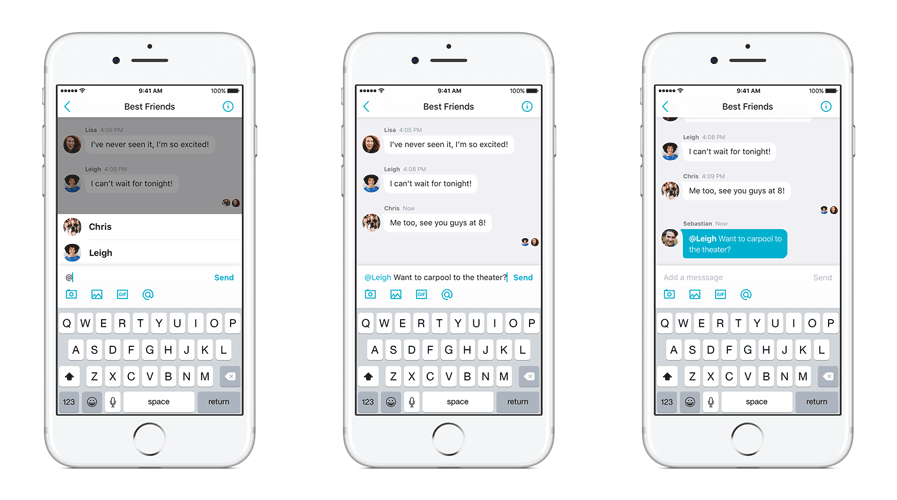
We know it can be difficult to get the attention of one person in a noisy group chat with multiple side conversations. With this new feature, the person you’re trying to reach will receive a special notification when you @mention them. Now, they’ll never accidentally miss your message again, even if they’ve muted the conversation. This feature is available on Android and iOS, and is coming to desktop and web soon!
Link Previews
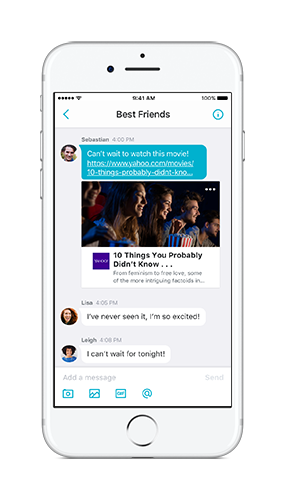
When you share a link in Yahoo Messenger, we’ll now conveniently display a preview so everyone in the conversation gets a snapshot of the content without having to open the link. We’re also making it easier for you to paste recently copied links into your Yahoo Messenger conversations. Once you copy a link from another app or website, we’ll prompt you to add it to a conversation with one tap as soon as you open the app.
The Yahoo Messenger team is always looking to create new features to enhance your messaging experience, and we look forward to hearing what you think about today’s update. Update or download the Yahoo Messenger app for iOS and Android today to enjoy these new features!
Engaging users, actively observing, and then incorporating feedback into product design is central to Yahoo’s product development work. In addition to routinely performing small group or one-on-one user research that includes people with disabilities, a method of engaging users and gathering feedback unique to the Yahoo User Experience Research and Accessibility (UXRA) team is something we call User Nights.
Image caption: Dozens of Yahoo engineers wearing themed T-shirts sitting side by side with volunteers, observing them using Yahoo mobile apps on their smartphones
User Nights pair a user-volunteer one-on-one with a Yahoo engineer who observes how they complete a set of familiar tasks. It’s unusual for companies to have user researchers at all (it’s a function that’s often outsourced to consultants) but for those that do, it’s not so unusual to conduct observational research and report findings to a product team. Yahoo does this routinely. But our User Nights are unique in that we also arrange for the engineers who are actively engaged in building a product to sit side-by-side for over an hour observing how people are using it—with no coaching. They’re able to experience first-hand what’s working, what’s not, and the creative and unexpected ways people are using their products. Feedback and lessons learned from these experiences find their way directly back into the next release.
As Yogi Berra once said, “You can observe a lot just by watching.”
Image caption: The cover of the new 2nd edition of the textbook, “Research Methods in Human-Computer Interaction.” It features a hand-drawn group of users sitting behind a computer including a user who is blind holding a cane.
If you are interesting in learning more about Yahoo User Nights, I’m delighted to let you know that they’re now featured as a case study in the newly published 2nd edition of the textbook Research Methods in HCI by Prof. Jonathan Lazar, Jinjuan Feng, and Harry Hochheiser published by Morgan Kaufmann. (Yahoo receives no financial compensation related to this book). The first edition was published in 2009 and is used in many universities around the world, including Harvard, Carnegie-Mellon, the University of Washington, the University of Toronto, HiOA (Norway), KTH (Sweden), Tel Aviv University (Israel) and others.
Yahoo is now part of Oath, a diverse house of 50+ media and technology brands that engages over a billion people around the world. Create brand love with us.
Yahoo is now part of Oath, a diverse house of 50+ media and technology brands that engages over a billion people around the world. Create brand love with us.
By Edward Bortnikov, Anastasia Braginsky, and Eshcar Hillel
Modern products powered by NoSQL key-value (KV-)storage technologies exhibit ever-increasing performance expectations. Ideally, NoSQL applications would like to enjoy the speed of in-memory databases without giving up on reliable persistent storage guarantees. Our Scalable Systems research team has implemented a new algorithm named Accordion, that takes a significant step toward this goal, into the forthcoming release of Apache HBase 2.0.
HBase, a distributed KV-store for Hadoop, is used by many companies every day to scale products seamlessly with huge volumes of data and deliver real-time performance. At Yahoo, HBase powers a variety of products, including Yahoo Mail, Yahoo Search, Flurry Analytics, and more. Accordion is a complete re-write of core parts of the HBase server technology, named RegionServer. It improves the server scalability via a better use of RAM. Namely, it accommodates more data in memory and writes to disk less frequently. This manifests in a number of desirable phenomena. First, HBase’s disk occupancy and write amplification are reduced. Second, more reads and writes get served from RAM, and less are stalled by disk I/O. Traditionally, these different metrics were considered at odds, and tuned at each other’s expense. With Accordion, they all get improved simultaneously.
We stress-tested Accordion-enabled HBase under a variety of workloads. Our experiments exercised different blends of reads and writes, as well as different key distributions (heavy-tailed versus uniform). We witnessed performance improvements across the board. Namely, we saw write throughput increases of 20% to 40% (depending on the workload), tail read latency reductions of up to 10%, disk write reductions of up to 30%, and also some modest Java garbage collection overhead reduction. The figures below further zoom into Accordion’s performance gains, compared to the legacy algorithm.
Figure 1. Accordion’s write throughput compared to the legacy implementation. 100GB dataset, 100-byte values, 100% write workload. Zipf (heavy-tailed) and Uniform primary key distributions.
Figure 3. Accordion’s disk I/O compared to the legacy implementation. 100GB dataset, 100-byte values, 100% write workload. Zipf key distribution.
Accordion is inspired by the Log-Structured-Merge (LSM) tree design pattern that governs HBase storage organization. An HBase region is stored as a sequence of searchable key-value maps. The topmost is a mutable in-memory store, called MemStore, which absorbs the recent write (put) operations. The rest are immutable HDFS files, called HFiles. Once a MemStore overflows, it is flushed to disk, creating a new HFile. HBase adopts multi-versioned concurrency control – that is, MemStore stores all data modifications as separate versions. Multiple versions of one key may therefore reside in MemStore and the HFile tier. A read (get) operation, which retrieves the value by key, scans the HFile data in BlockCache, seeking the latest version. To reduce the number of disk accesses, HFiles are merged in the background. This process, called compaction, removes the redundant cells and creates larger files.
LSM trees deliver superior write performance by transforming random application-level I/O to sequential disk I/O. However, their traditional design makes no attempt to compact the in-memory data. This stems from historical reasons: LSM trees were designed in the age when RAM was in very short supply, and therefore the MemStore capacity was small. With recent changes in the hardware landscape, the overall MemStore size managed by RegionServer can be multiple gigabytes, leaving a lot of headroom for optimization.
Accordion reapplies the LSM principle to MemStore in order to eliminate redundancies and other overhead while the data is still in RAM. The MemStore memory image is therefore “breathing” (periodically expanding and contracting), similarly to how an accordion bellows. This work pattern decreases the frequency of flushes to HDFS, thereby reducing the write amplification and the overall disk footprint.
With fewer flushes, the write operations are stalled less frequently as the MemStore overflows, and as a result, the write performance is improved. Less data on disk also implies less pressure on the block cache, higher hit rates, and eventually better read response times. Finally, having fewer disk writes also means having less compaction happening in the background, i.e., fewer cycles are stolen from productive (read and write) work. All in all, the effect of in-memory compaction can be thought of as a catalyst that enables the system to move faster as a whole.
Accordion currently provides two levels of in-memory compaction: basic and eager. The former applies generic optimizations that are good for all data update patterns. The latter is most useful for applications with high data churn, like producer-consumer queues, shopping carts, shared counters, etc. All these use cases feature frequent updates of the same keys, which generate multiple redundant versions that the algorithm takes advantage of to provide more value. Future implementations may tune the optimal compaction policy automatically.
Accordion replaces the default MemStore implementation in the production HBase code. Contributing its code to production HBase could not have happened without intensive work with the open source Hadoop community, with contributors stretched across companies, countries, and continents. The project took almost two years to complete, from inception to delivery.
Accordion will become generally available in the upcoming HBase 2.0 release. We can’t wait to see it power existing and future products at Yahoo and elsewhere.
We’re excited to announce that Cities Rising: Rebuilding America, a Yahoo News docuseries, is returning this summer with all new episodes. Join Yahoo for an up-close and personal look at three iconic U.S. cities, as told over two episodes each.
In the first episode, launching today, Katie Couric visits Cleveland, a city residents like to call “the best location in the nation.” During her tour she visits the Cleveland Clinic, where she checks out a new breakthrough technology, the HoloLens, that is transforming the study of the human anatomy. Couric also visits the Cleveland Browns stadium with WKYC’s sports director, Jim Donovan, who discusses the Cavaliers’ historic 2016 NBA championship. She samples local treats at West Side Market, the oldest operating indoor-outdoor market space in the city, and catches up with Matthew McConaughey, who filmed his new movie in Cleveland and has plans to launch his Just Keep Livin Foundation curriculum there at John Adams High School.
New episodes of Cities Rising: Rebuilding America will publish twice a month on Yahoo. The visit to Cleveland is followed by stops in New York City’s largest and most diverse area, the borough of Queens, and finally the “Valley of the Sun,” Phoenix. The first episode of each installment explores how the city is making pivotal changes to reinvent itself, while taking a look at issues that are core to rebuilding: education, the economy and infrastructure. The second episode will focus on fun — the arts and culture, sports, food and nightlife scenes that make life exciting in the city.
By Brett Illers, Program Manager, Energy Efficiency and Sustainability
Late last week, President Trump initiated a U.S. withdrawal from the Paris Agreement, resulting in a lot of speculation about the implications for the global effort to combat climate change. One thing, however, remains unchanged: Yahoo’s commitment to continue to reduce its own carbon footprint.
In a letter to President Trump today, we joined nearly 1,000 other entities–U.S. companies, cities, counties, states and academic institutions–in reiterating our commitment to the benchmarks set out in the Paris Agreement. No matter the administration or policy, we agree with the data that shows a causal relationship between human carbon emissions and the rise in global temperatures.
For this reason, we’ve set out to be transparent about our carbon emissions data, advocate for smart energy policies and develop innovative solutions to achieve more efficient, sustainable business operations. And our efforts don’t go unnoticed – we consistently earn high marks from nonprofit reporting agencies like the Climate Disclosure Project.
At the center of this effort are our data centers. By and large they are our greatest producers of carbon, however, we’ve taken great strides to keep them operating efficiently and with renewable sources of energy. It’s a point of pride for the many Yahoos who work to keep our networks and platforms powered for our more than 1 billion active users 24/7, 365 days a year.
What does one of the most efficient data centers in the world look like? Our patented chicken coop design has allowed for best in class energy and water efficiency, including a 75% reduction in cooling energy compared to a typical data center design. We boast this technology at some of our largest data center locations, including in Lockport, New York and Quincy, Washington.
Combined with other companywide campaigns to keep our business’s
carbon footprint as low impact as possible, as well as our philosophical
stance of placing high value on our limited natural resources, our
position is clear: Yahoo stands by the Paris Agreement.
By Pia Wüstenhöfer, Senior Supervisor, Account Operations
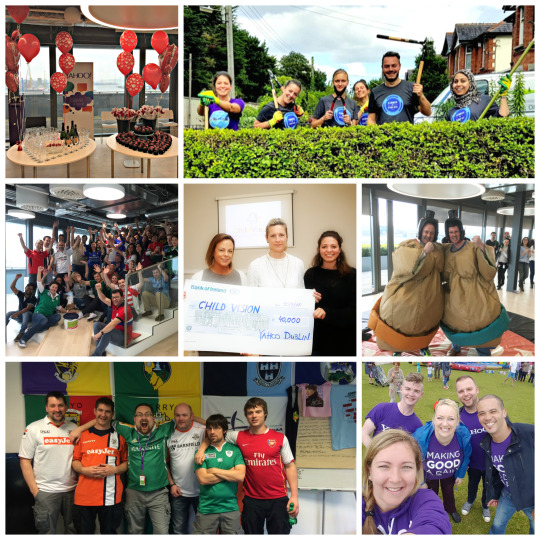
Our Yahoo employees never fail to go the extra mile with hard work and generosity. Yahoos in Dublin raised a whopping €40,000 (that’s $44,960) for ChildVision, Yahoo’s preferred charity for 2016. ChildVision is an organization dedicated to the support and education of blind and multi-disabled children. Being the only school of its kind in Ireland, it doesn’t get the state funding it needs to provide the desired level of care to those who need their help. That’s where our employees stepped in!
Ours teams in Dublin set out to support ChildVision to increase exposure and provide donations to fund improvements for those in their care. Through various office events, including “sumo wrestling your manager” and surprising your valentine, our fun-loving employees had a blast raising awareness for the cause.
A massive thank you to everyone who’s supported this organization and thanks to our Dublin employees for providing this donation!
OpenStack powers the infrastructure fabric for Yahoo’s private cloud. At the OpenStack Summit last week in Boston, senior engineer Arun Selvaraj delivered a presentation on Yahoo’s learnings from scaling OpenStack Ironic. Recently, Yahoo deployed OpenStack Ironic to manage some of the hundreds of thousands of servers in our datacenters. As we imported new nodes into Ironic, we faced a number of challenges related to scale. In his talk, Arun discussed how we solved problems related to baremetal provisioning, and also dove into how we scaled and optimized components such nova-compute, ironic-conductor, and neutron-dhcp-agent.
The talk covered the following five key components, and you can watch it below:
Problems with nova-compute in scale and how we solved them
Scaling neutron-dhcp-agent with dhcpd driver
Scaling ironic-conductors
Dealing with hardware/firmware and ipmi issues in the data centers
By Lee Boynton, Henry Avetisyan, Ken Fox, Itsik Figenblat, Mujib Wahab, Gurpreet Kaur, Usha Parsa, and Preeti Somal
Today, we are pleased to offer Athenz, an open-source platform for fine-grained access control, to the community. Athenz is a role-based access control (RBAC) solution, providing trusted relationships between applications and services deployed within an organization requiring authorized access.
If you need to grant access to a set of resources that your applications or services manage, Athenz provides both a centralized and a decentralized authorization model to do so. Whether you are using container or VM technology independently or on bare metal, you may need a dynamic and scalable authorization solution. Athenz supports moving workloads from one node to another and gives new compute resources authorization to connect to other services within minutes, as opposed to relying on IP and network ACL solutions that take time to propagate within a large system. Moreover, in very high-scale situations, you may run out of the limited number of network ACL rules that your hardware can support.
Prior to creating Athenz, we had multiple ways of managing permissions and access control across all services within Yahoo. To simplify, we built a fine-grained, role-based authorization solution that would satisfy the feature and performance requirements our products demand. Athenz was built with open source in mind so as to share it with the community and further its development.
At Yahoo, Athenz authorizes the dynamic creation of compute instances and containerized workloads, secures builds and deployment of their artifacts to our Docker registry, and among other uses, manages the data access from our centralized key management system to an authorized application or service.
Athenz provides a REST-based set of APIs modeled in Resource Description Language (RDL) to manage all aspects of the authorization system, and includes Java and Go client libraries to quickly and easily integrate your application with Athenz. It allows product administrators to manage what roles are allowed or denied to their applications or services in a centralized management system through a self-serve UI.
Access Control Models
Athenz provides two authorization access control models based on your applications’ or services’ performance needs. More commonly used, the centralized access control model is ideal for provisioning and configuration needs. In instances where performance is absolutely critical for your applications or services, we provide a unique decentralized access control model that provides on-box enforcement of authorization.
Athenz’s authorization system utilizes two types of tokens: principal tokens (N-Tokens) and role tokens (Z-Tokens). The principal token is an identity token that identifies either a user or a service. A service generates its principal token using that service’s private key. Role tokens authorize a given principal to assume some number of roles in a domain for a limited period of time. Like principal tokens, they are signed to prevent tampering. The name “Athenz” is derived from “Auth” and the ‘N’ and 'Z’ tokens.
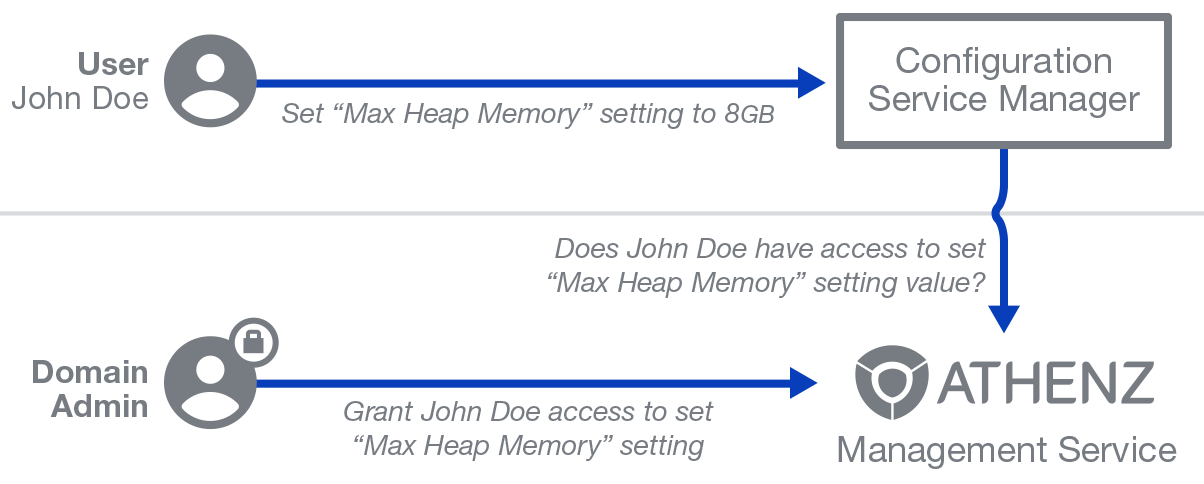
Centralized Access Control: The centralized access control model requires any Athenz-enabled application to contact the Athenz Management Service directly to determine if a specific authenticated principal (user and/or service) has been authorized to carry out the given action on the requested resource. At Yahoo, our internal continuous delivery solution uses this model. A service receives a simple Boolean answer whether or not the request should be processed or rejected. In this model, the Athenz Management Service is the only component that needs to be deployed and managed within your environment. Therefore, it is suitable for provisioning and configuration use cases where the number of requests processed by the server is small and the latency for authorization checks is not important.
The diagram below shows a typical control plane-provisioning request handled by an Athenz-protected service.
Athenz Centralized Access Control Model
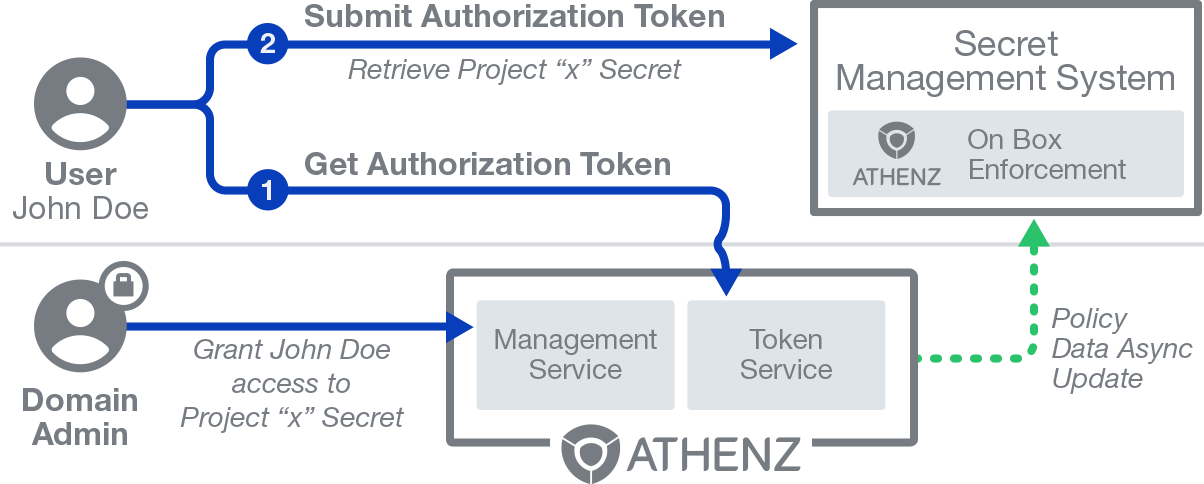
Decentralized Access Control: This approach is ideal where the application is required to handle large number of requests per second and latency is a concern. It’s far more efficient to check authorization on the host itself and avoid the synchronous network call to a centralized Athenz Management Service. Athenz provides a way to do this with its decentralized service using a local policy engine library on the local box. At Yahoo, this is an approach we use for our centralized key management system. The authorization policies defining which roles have been authorized to carry out specific actions on resources, are asynchronously updated on application hosts and used by the Athenz local policy engine to evaluate the authorization check. In this model, a principal needs to contact the Athenz Token Service first to retrieve an authorization role token for the request and submit that token as part of its request to the Athenz protected service. The same role token can then be re-used for its lifetime.
The diagram below shows a typical decentralized authorization request handled by an Athenz-protected service.
Athenz Decentralized Access Control Model
With the power of an RBAC system in which you can choose a model to deploy according your performance latency needs, and the flexibility to choose either or both of the models in a complex environment of hosting platforms or products, it gives you the ability to run your business with agility and scale.
Looking to the Future
We are actively engaged in pushing the scale and reliability boundaries of Athenz. As we enhance Athenz, we look forward to working with the community on the following features:
Using local CA signed TLS certificates
Extending Athenz with a generalized model for service providers to launch instances with bootstrapped Athenz service identity TLS certificates
Integration with public cloud services like AWS. For example, launching an EC2 instance with a configured Athenz service identity or obtaining AWS temporary credentials based on authorization policies defined in ZMS.
Our goal is to integrate Athenz with other open source projects that require authorization support and we welcome contributions from the community to make that happen. It is available under Apache License Version 2.0. To evaluate Athenz, we provide both AWS AMI and Docker images so that you can quickly have a test development environment up and running with ZMS (Athenz Management Service), ZTS (Athenz Token Service), and UI services. Please join us on the path to making application authorization easy. Visit http://www.athenz.io to get started!
“Don’t let the fox guard the henhouse,” the old adage goes. But for our bug bounty program, we’ve flipped this conventional wisdom on its head to yield some strong results for the security of our online properties.
Since its inception three years ago, our bug bounty program has increasingly helped to harden the security of our products. Over this short period, we’ve received thousands of submissions, and, as of December 2016, the bounties awarded for reports that resulted in real bug fixes has now surpassed a total of $2 million. Just last month, a security researcher helped us identify and patch a vulnerability in Flickr.
In 2016 alone, we awarded nearly 200 researchers around the world. These bounties helped to fix vulnerabilities of varying severity across our web properties. Most bounties accounted for less impactful vulnerabilities, but some were more substantial.
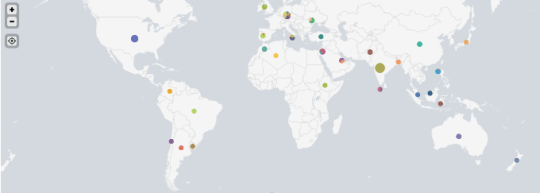
Yes, this all comes with a degree of vulnerability. After all, we’re asking some of the world’s best hackers to seek out soft spots in our defenses. But it’s acceptable risk. The right incentives combined with some hackers who actually want to do some good has resulted in a diverse and growing global community of contributors to our security. Currently, our bug bounty program sees more than 2,000 contributors from more than 80 countries.
Visual representation of the locations of researchers who have contributed to Yahoo’s bug bounty program.
In 2017, we’ll look to continue to foster this healthy marriage in security. Attracting the highest skilled hackers to our program with meaningful bounties will continue to result in impactful bug reporting.
By Chris Madsen, Assistant General Counsel, Head of Global Law Enforcement, Security and Safety
Today we released the latest update to our biannual transparency report. We are sharing the number of government requests we received globally for user information, as well as government requests to remove content, during the second half of 2016.
In this reporting period, we received a total of 11,247 data requests from governments worldwide. All requests for the latest reporting period are accounted for here.
As with past updates, we’ve provided the number of National Security Letters (NSLs) that Yahoo received during the reporting period and the number of accounts that were specified in those NSLs. These numbers generally are reported in bands of 500, starting with 0 - 499, as this is the maximum amount of detail that Yahoo may provide under U.S. law when reporting NSLs in aggregate.
However, with the enactment of the USA Freedom Act, the FBI must now periodically assess whether a NSL’s nondisclosure requirement is still appropriate, and to lift it when it’s not. Since our last update in October 2016, the FBI has lifted the nondisclosure requirement with respect to additional NSLs to Yahoo (which are substantively similar to the NSLs we publicly disclosed in June 2016). Specifically, the lower end of the band has been adjusted for the following reporting periods to reflect the fact that we can now legally disclose having received particular NSLs during those periods: July - December 2014, January - June 2015, July - December 2015 and January - June 2016.
We remain unwavering in our commitment to carefully scrutinize government requests for user data and content removal consistent with our Global Principles for Responding to Government Requests and with the Global Network Initiative Principles, and we continue to engage with governments and key stakeholders to advocate for the ability to provide more transparency around government requests.
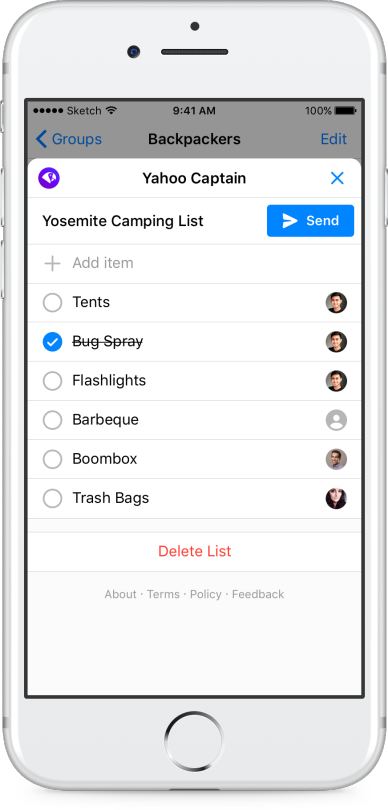
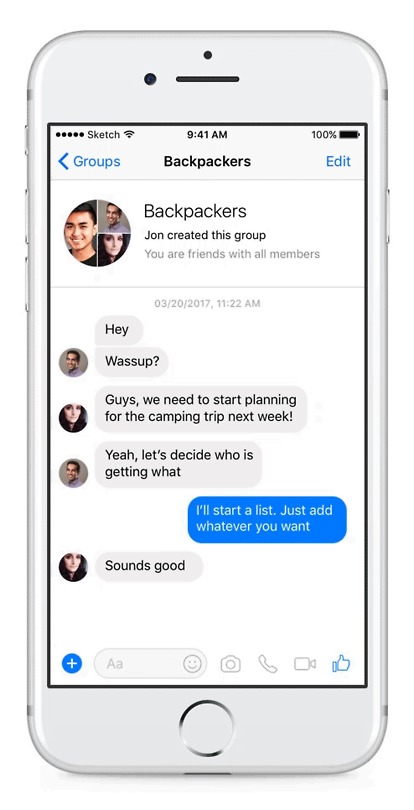
We’re excited to bring Captain to Facebook Messenger as part of the first wave of bots on the newly announced Chat Extensions feature, enabling people to use Captain seamlessly with their friends and family right in Messenger.
Captain on Messenger streamlines organization among groups, family, and friends for managing activities with a shared tasks list. Use Captain to figure out who’s bringing what on your next backpacking trip or plan for an upcoming potluck dinner – without leaving Messenger. With Captain, you can make plans with your favorite people without overloading them with tons of notifications and long, unorganized lists of requests and questions.
“We are delighted that Yahoo is launching Captain on Messenger,” said Stan Chudnovsky, Vice President of Product for Messenger. “This bot will help users simplify group coordination, which can get harder the larger the group and longer the thread. This experience makes that interaction seamless.”
To start using Captain on Messenger, just add the bot to your group conversation.
We launched Captain last month for text messaging to help families stay organized. We continue to iterate on our products to help users make life easier and more fun. Give Captain a try today and share feedback directly from the bot!
By Shani Clark, Senior Director, Product Management
We all know how busy life can get. It can be challenging to remember what we need at the grocery store or the schedule for the next soccer practice.
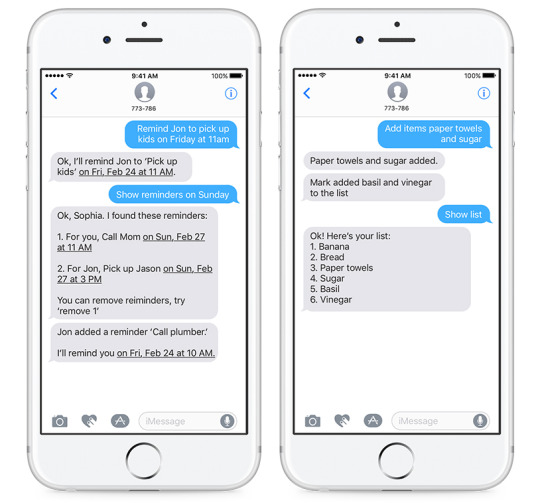
Now, available in the U.S., Captain is a bot assistant that helps manage lists and reminders for you and your family via text message. Gone are the days of interrupting your spouse’s workday with updated carpool information and fielding text messages from your kids about what they need from the store. And say goodbye to downloading apps to try and stay organized.
Captain streamlines family communications for sharing activities, setting reminders and updating a master shopping list. Text Captain to remind your partner to pick up the kids on Friday at 11am or add “paper towels and sugar” to the shopping list in real-time while they’re at the store. If you forget what’s on tap for the day, just ask Captain.
Using Captain is simple – nothing new to download, no passwords to remember – just text “Hi” to 773-786. Captain will text back setup instructions. Sprint customers will need to unblock shortened links to begin the process.
Following a recent investigation, we’ve identified data security issues concerning certain Yahoo user accounts. We’ve taken steps to secure those user accounts and we’re working closely with law enforcement.
What happened?
As we previously disclosed in November, law enforcement provided us with data files that a third party claimed was Yahoo user data. We analyzed this data with the assistance of outside forensic experts and found that it appears to be Yahoo user data. Based on further analysis of this data by the forensic experts, we believe an unauthorized third party, in August 2013, stole data associated with more than one billion user accounts. We have not been able to identify the intrusion associated with this theft. We believe this incident is likely distinct from the incident we disclosed on September 22, 2016.
For potentially affected accounts, the stolen user account information may have included names, email addresses, telephone numbers, dates of birth, hashed passwords (using MD5) and, in some cases, encrypted or unencrypted security questions and answers. The investigation indicates that the stolen information did not include passwords in clear text, payment card data, or bank account information. Payment card data and bank account information are not stored in the system the company believes was affected.
Separately, we previously disclosed that our outside forensic experts were investigating the creation of forged cookies that could allow an intruder to access users’ accounts without a password. Based on the ongoing investigation, we believe an unauthorized third party accessed our proprietary code to learn how to forge cookies. The outside forensic experts have identified user accounts for which they believe forged cookies were taken or used. We are notifying the affected account holders, and have invalidated the forged cookies. We have connected some of this activity to the same state-sponsored actor believed to be responsible for the data theft the company disclosed on September 22, 2016.
What are we doing to protect our users?
We are notifying potentially affected users and have taken steps to secure their accounts, including requiring users to change their passwords. We have also invalidated unencrypted security questions and answers so that they cannot be used to access an account. With respect to the cookie forging activity, we invalidated the forged cookies and hardened our systems to secure them against similar attacks. We continuously enhance our safeguards and systems that detect and prevent unauthorized access to user accounts.
What can users do to protect their account?
We encourage our users to visit our Safety Center page for recommendations on how to stay secure online. Some important recommendations we’re re-emphasizing today include the following:
Change your passwords and security questions and answers for any other accounts on which you used the same or similar information used for your Yahoo account;
Review all of your accounts for suspicious activity;
Be cautious of any unsolicited communications that ask for your personal information or refer you to a web page asking for personal information;
Avoid clicking on links or downloading attachments from suspicious emails; and
Consider using Yahoo Account Key, a simple authentication tool that eliminates the need to use a password on Yahoo altogether.
For more information about these security matters and our security resources, please visit the Yahoo Security Issue FAQs page, https://yahoo.com/security-update.
Statements in this press release regarding the findings of Yahoo’s ongoing investigations involve potential risks and uncertainties. The final conclusions of the investigations may differ from the findings to date due to various factors including, but not limited to, the discovery of new or additional information and other developments that may arise during the course of the investigation. More information about potential risks and uncertainties of security breaches that could affect the Company’s business and financial results is included under the caption “Risk Factors” in the Company’s Quarterly Report on Form 10-Q for the quarter ended September 30, 2016, which is on file with the SEC and available on the SEC’s website atwww.sec.gov.
By Paul Montoy-Wilson, Product Manager of Yahoo Aviate and Co-Founder of Aviate
When looking for an app on your mobile phone, it can be aggravating to sift through pages and pages of applications. What if your phone could just show you the information you wanted instead of forcing you through multiple steps to get there?
As the next step toward making this a reality, we’ve reimagined Spaces in Yahoo Aviate to bring you the Smart Stream. Now Aviate assembles relevant information front and center so you can take action right away. The Smart Stream adjusts the content it surfaces throughout your day, based on where you are and what you’re doing, allowing us to guide you to the information you want. And, the Smart Stream becomes smarter and more personalized as you use it.
Imagine you’re walking downtown in San Francisco on a Saturday around noon. We’ll surface nearby restaurants so that you can find a yummy place to eat. When the Giants game starts at 1pm, we’ll bring you live sports scores. If you plug in your headphones, we’ll pull your music apps up to the top of your Smart Stream. If there’s ever a specific card you’re looking for, you can always access it with the Focus menu, located in the search bar on your homescreen.
We’ve tested many new features over the past few months, working to improve the experience and anticipate your needs. We’re just getting started and look forward to hearing what you think.
Keep flyin’,
The Aviate Crew
Note: This update is currently available to English users in the United States on Android 4.1 (Jelly Bean) and above. We’ve made the decision to no longer support Android 4.0.4 or older with this update.
The baseball movie went in decidedly different directions starting in the 1970s and '80s compared to what Hollywood had done 20 or 30 years prior. By the 1970s, movies about baseball had taken a considerably long break for reasons unknown. It took the 1973 movie Bang the Drum Slowly with a young Robert De Niro playing a pitcher to reignite interest in baseball movies after over a decade of nothing. Perhaps the disruption of America through the turbulent '60s didn't put enough people in the mood to celebrate baseball cinematically, despite the game itself still flourishing during the decade. Ten years prior to Bang the Drum Slowly, there was a movie called Safe at Home, which had non-actor baseball greats Mickey Mantle and Roger Maris playing themselves. Perhaps their lack of acting ability killed the baseball movie for the above duration. But that movie was a bit of a set...
Has this ever happened to you: you go to the cinema, sit down in front of the big screen and five minutes after the movie starts you feel like you have seen the same film before. OK, maybe not the same but it's very similar to ten's of other. This happens to me a lot because I watch movies regularly but let me tell you something - this is not the case when you watch Fifty Shades of Grey online free and I really like this. The movie is very different and refreshing, not the usual romance or drama, original plot unlike most of the latest hollywood productions. There is a lot of controversy about Fifty Shades of Grey - some people love the film and some think it's no so good and the plot is thin. They are all right on they own, the truth is the storyline is...
planetyahoo is moving to a new server and also to a new software. As usual you should observe no disturbance but in case, don't hesitate to contact webmaster AT gobio2.net
With the recent closing of Yahoo! 360, some feeds dissapeared, others moved, and some new ones were added. I also plan some updates on Planet Yahoo! in the coming weeks.
 (Totally unofficial, you understand.)


 by Ali Onur Basal